
Getting the block plan scale right is one of the most common reasons UK planning applications succeed—or fail.
While it seems like a small technical detail, scale directly affects whether your drawing is considered valid, measurable, and compliant.
This guide explains exactly what scale you need, how to apply it correctly, and how to avoid costly mistakes.
What Is a Block Plan Scale?
A block plan scale defines how distances on your drawing relate to real-world measurements.
Typical examples include:
- 1:200 → 1 unit = 200 units in reality
- 1:500 → 1 unit = 500 units in reality
In planning terms, this ensures:
- Accurate site representation
- Measurable distances for planners
- Consistent interpretation across documents
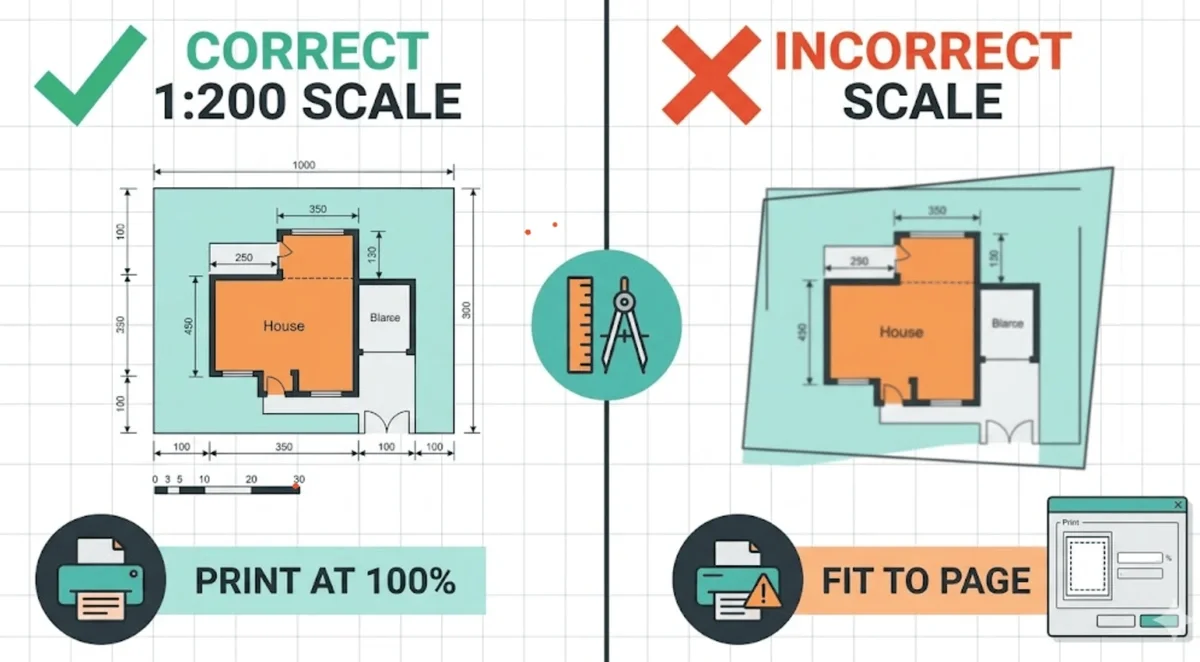
Standard Block Plan Scales in the UK
For most planning applications, local authorities expect:
1:200 Scale (Most Common)
Used for:
- Residential extensions
- Small developments
- Detailed site layouts
1:500 Scale
Used for:
- Larger sites
- Rural plots
- Less detailed submissions
Key rule:
Your scale must allow planners to measure distances directly from the drawing.
Why Scale Matters for Planning Approval
Incorrect scale is a validation issue, not just a preference.
If your block plan scale is wrong:
- Your application may be invalidated immediately
- You’ll face resubmission delays
- Project timelines can slip by weeks
Planning officers rely on scale to assess:
- Boundary distances
- Building proximity
- Access and highways
- Neighbour impact
Common Block Plan Scale Mistakes
1. “Fit to Page” Printing Errors
This is the most frequent issue.
Even if your CAD drawing is correct, printing settings can distort scale.
Fix: Always print at 100% / actual size
2. Missing Scale Bar
A numeric scale alone isn’t enough.
You must include:
- A scale bar
- A scale label (e.g. 1:200)
3. Using Non-Standard Scales
Avoid scales like:
- 1:250
- 1:300
These are rarely accepted and can trigger validation issues.
4. Incorrect Paper Size
Scaling depends on paper size (A4, A3, A1).
If the drawing is resized without adjusting scale, it becomes invalid.
Block Plan Scale vs Location Plan Scale
These are often confused.
| Plan Type | Typical Scale |
|---|---|
| Location Plan | 1:1250 or 1:2500 |
| Block Plan | 1:200 or 1:500 |
Important:
They serve different purposes and are not interchangeable.
How to Set the Correct Scale in CAD
To ensure accuracy:
- Draw in real-world units (metres)
- Use a layout viewport
- Apply scale factor (e.g. 1:200)
- Lock the viewport
- Export to PDF at 100%
This avoids:
- Manual scaling errors
- Measurement inconsistencies
How MapServe Ensures Correct Block Plan Scale
At MapServe, block plans are:
- Generated from accurate mapping datasets
- Delivered at planning-compliant scales
- Ready for instant submission
This removes:
- CAD setup time
- Scaling errors
- Validation risks
👉 See our block plans service for compliant drawings.
When to Use 1:200 vs 1:500
Use 1:200 when:
- Detail matters
- Boundaries are tight
- Urban environments
Use 1:500 when:
- Site is large
- Less detail required
- Rural or open land
Pro Tip: Always Include Dimensions
Even with correct scale, adding dimensions:
- Speeds up planning review
- Reduces ambiguity
- Strengthens your submission
FAQs
1. What scale should a block plan be in the UK?
Typically 1:200 or 1:500, depending on site size and detail.
2. Can I use 1:250 for a block plan?
Not recommended. Most councils expect standard scales only.
3. Why was my planning application rejected for scale?
Likely due to:
- Incorrect print scaling
- Missing scale bar
- Non-standard scale
4. Does PDF scaling affect planning approval?
Yes. If not printed at 100%, your drawing becomes invalid.
5. Do I need both a scale label and scale bar?
Yes. Both are required for compliance.