
Trees can shape a project long before a planning application is submitted.
For architects, planners, surveyors and developers, the risk is not simply that trees exist on or near a site. The real issue is discovering too late that tree cover affects the layout, access, daylight, buildable area or planning strategy.
That is where tree constraints mapping using National Tree Map™ CAD data becomes useful.
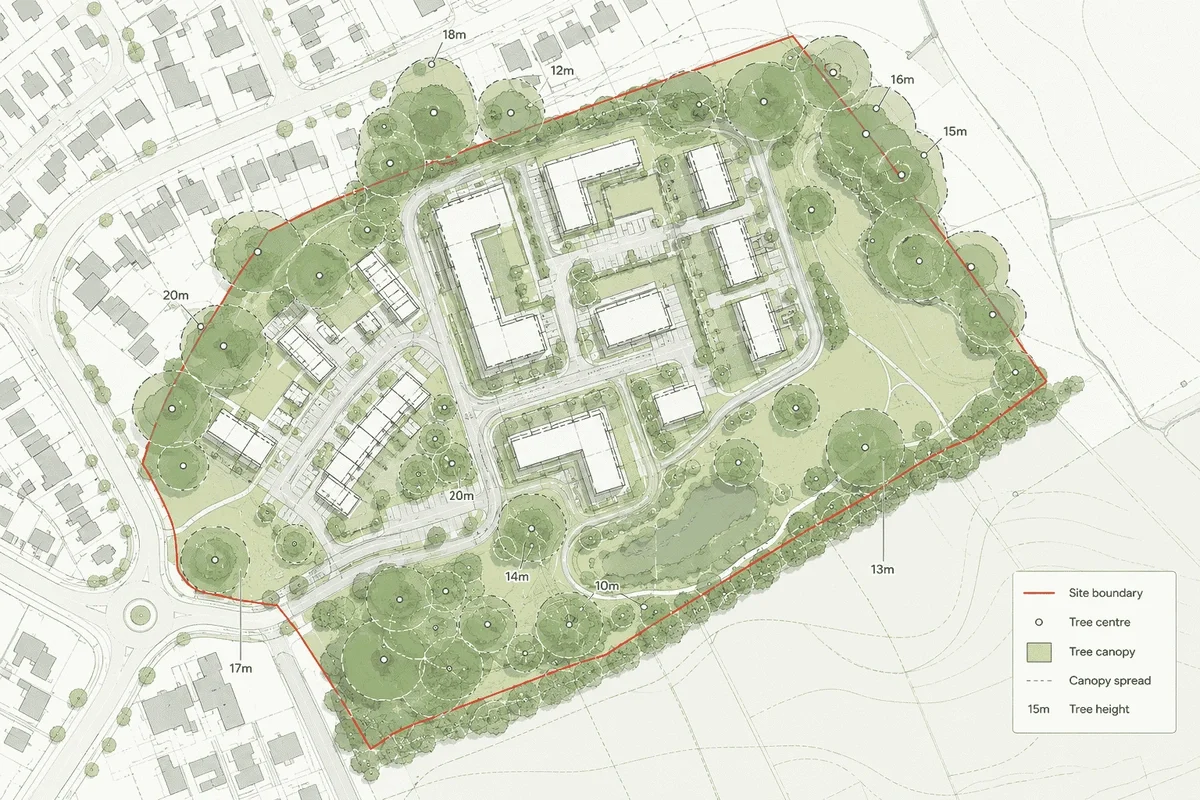
A tree constraints map gives project teams an early view of tree location, canopy spread and height in relation to buildings, boundaries, roads and other site features. It does not replace an arboricultural survey, but it can help identify where further investigation may be needed before too much design time is spent.
MapServe supplies the National Tree Map™ as a CAD layer alongside OS MasterMap®, showing tree location, height and canopy or crown extent for trees and bushes over 3m across England, Wales and Scotland. It is designed for early-stage feasibility, planning context, site analysis and environmental mapping.
Why tree constraints are often missed early
Early feasibility work often starts with a base map, ownership information, photographs and perhaps a quick desktop planning review.
That can be enough for a first conversation, but it can miss one important layer: tree cover.
On constrained sites, trees can influence:
- building position
- access routes
- parking layouts
- visibility splays
- drainage strategy
- daylight and overshadowing
- ecology and biodiversity assumptions
- planning risk
- survey requirements
The difficulty is that tree information is often considered later, once an arboriculturist is appointed or once a planning consultant flags the issue.
By then, the design may already be moving in the wrong direction.
What a tree constraints map should show
A useful tree constraints map should put tree information into the same spatial context as the rest of the site.
For professional use, that usually means combining tree data with:
- OS MasterMap® and road detail:
- site boundaries
- nearby structures
- access points
- land parcels
- contours where levels matter
- building heights where urban context matters
- planning constraints where available
MapServe’s National Tree Map™ layer includes canopy polygons, centre point locations, simplified circular canopy polygons, maximum height values, average height values, height variation, survey date information, perimeter length and detailed irregular canopy polygons.
That gives project teams a much better starting point than relying on aerial imagery alone.
How architects can use tree constraints mapping
For architects, the main value is design confidence.
Tree canopy and height data can help answer questions such as:
- Is there an obvious tree conflict before the first layout is drawn?
- Could the building footprint need to move?
- Is there a likely pinch point around access?
- Are there mature trees close to neighbouring boundaries?
- Could canopy spread affect outlook, daylight or usable garden space?
- Is an arboricultural survey likely to be needed?
The goal is not to make final tree decisions from desktop data alone. It is to avoid designing blind.
A CAD-ready tree layer is especially useful because it can sit directly inside the same DWG or DXF workflow as the rest of the site plan. MapServe provides the National Tree Map™ in DWG and DXF formats alongside OS MasterMap®, making it suitable for CAD-based planning and site analysis workflows.
How developers can use tree constraints mapping
For developers, tree constraints mapping is useful during land appraisal and early feasibility.
A site may appear developable from ownership, access and planning policy checks, but trees can still affect viability.
Tree cover may influence:
- developable area
- density assumptions
- access strategy
- construction logistics
- mitigation costs
- programme risk
- survey budgets
- planning negotiation
A desktop tree constraints map can help a developer decide whether a site needs arboricultural input before offer, before option agreement, or before commissioning a full design package.
This is particularly useful when comparing multiple sites. Instead of waiting until later design stages, teams can screen tree cover earlier and prioritise sites where risk is easier to understand.
Tree constraints mapping and planning applications
Planning authorities may expect tree issues to be addressed where trees are present on or near a development site.
A tree constraints map can support early planning preparation by helping teams identify:
- trees within the site boundary
- trees close to proposed access
- neighbouring trees with canopies overhanging the site
- tree groups that may shape the layout
- areas where a BS5837 survey may be required
- whether additional TPO or conservation area checks are needed
For early-stage planning context, a Tree Preservation Order map can help flag where protected tree constraints may need further investigation with the relevant local planning authority.
However, it is important to be clear about limitations.
The National Tree Map™ is useful for tree context and early-stage constraints screening, but it does not confirm Tree Preservation Order status and does not replace a BS5837 arboricultural survey where species, condition, category and root protection areas are required.
That distinction matters. Desktop mapping is best used to identify risk earlier, not to replace professional site inspection where planning evidence is required.
National Tree Map™ vs aerial photography
Aerial imagery is useful, but it is not the same as structured tree data.
Aerial imagery can show where vegetation appears to be, but it may not provide:
- individual tree centre points
- canopy attributes
- height values
- CAD-ready tree layers
- consistent tree object geometry
- data that can be measured and layered in a professional drawing
The National Tree Map™ provides structured tree location, height and canopy information. MapServe’s page notes that Bluesky’s National Tree Map™ v2 has over 98% canopy coverage accuracy and over 99% accuracy within 50m of buildings.
For planning and design teams, that makes it more useful than a visual check alone.
When tree constraints mapping is most valuable
Tree constraints mapping is particularly useful at four points in a project.
1. Before buying or optioning land
Developers can screen whether tree cover is likely to affect layout, access or viability, while also understanding the wider role of National Tree Map™ data in sustainable development.
2. Before concept design
Architects can avoid placing buildings, parking or access routes in areas where trees may later cause problems.
3. Before commissioning surveys
Surveyors and consultants can use the map to scope what additional work may be needed.
4. Before planning submission
Planning consultants can sense-check whether tree-related issues have been considered before validation or officer review.
What tree constraints mapping cannot do
A good tree constraints map is a decision-support tool, not a substitute for professional judgement.
It will not confirm:
- tree species
- tree condition
- structural defects
- root protection areas
- BS5837 categorisation
- Tree Preservation Order status
- whether a tree has recently been removed or pruned
MapServe clearly positions the National Tree Map™ as useful for desktop assessment and CAD context, but not as a replacement for an arboricultural survey where site-specific tree condition, species, root protection areas or planning evidence is required.
Practical workflow: how to use tree constraints mapping
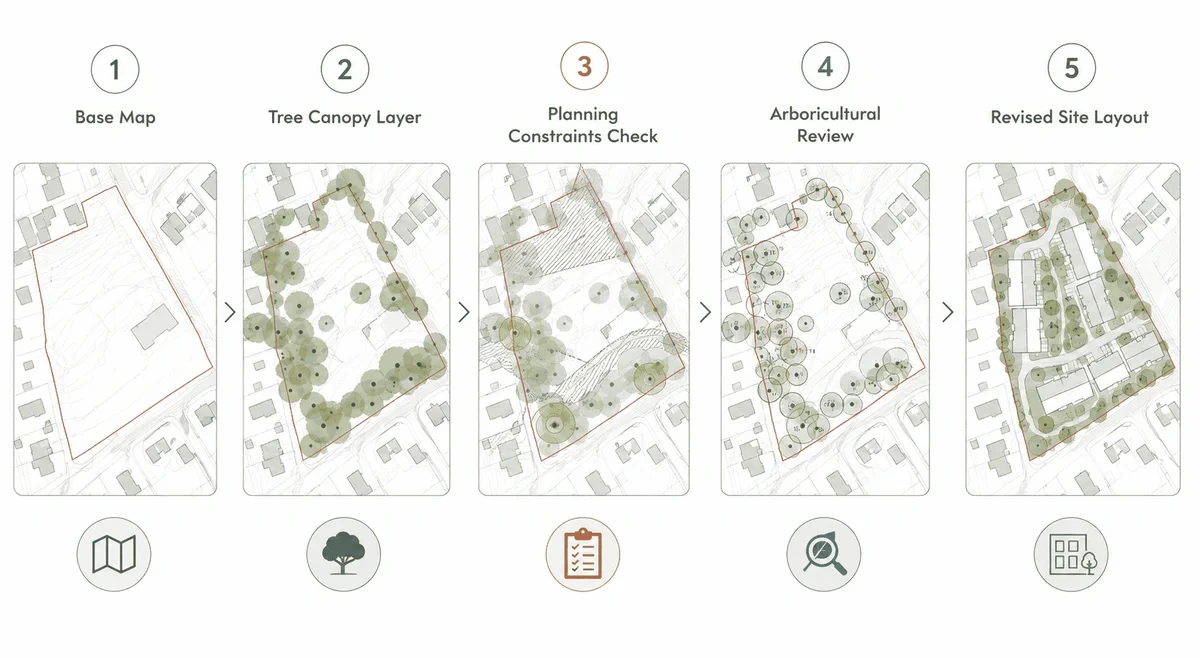
A simple professional workflow could look like this:
- Start with OS MasterMap® for the base site context.
- Add National Tree Map™ data as a CAD layer.
- Review tree height, canopy spread and location.
- Check obvious conflicts with proposed access, buildings and parking.
- Cross-check planning constraints such as TPOs, conservation areas and heritage designations. Tree constraints are most useful when reviewed alongside planning maps that show wider site and policy context.
- Decide whether an arboricultural survey is needed.
- Use the findings to refine the design brief before detailed drawing begins.
This approach helps reduce redesign risk and gives the wider project team a clearer starting point.
Conclusion
Tree constraints are easy to underestimate at the start of a project.
For architects, planners, surveyors and developers, the cost of missing tree issues is rarely just a missing dataset. It can mean redesign, delays, additional surveys, planning objections or reduced developable area.
Tree constraints mapping helps teams identify risk earlier.
MapServe’s National Tree Map™ in DWG and DXF gives professionals a CAD-ready view of tree location, height and canopy context alongside OS MasterMap®, making it a practical starting point for feasibility, planning and site analysis.
Explore MapServe’s National Tree Map™ for CAD-ready tree canopy, height and location data.
FAQs
What is tree constraints mapping?
Tree constraints mapping is the process of showing tree location, canopy spread and height in relation to a site, buildings, boundaries and access points.
Does tree constraints mapping replace a tree survey?
No. It can support early-stage screening, but it does not replace a BS5837 arboricultural survey where species, condition, category or root protection areas are needed.
Can architects use tree data in AutoCAD?
Yes. MapServe supplies National Tree Map™ data in DWG and DXF formats, so it can be used in CAD workflows.
Does the National Tree Map™ show TPOs?
No. It shows tree location, height and canopy extent. TPO status should be checked separately.
When should developers check tree constraints?
Ideally during early feasibility, before design work becomes too detailed or land decisions are made.