
Google Maps is one of the world’s most widely used mapping platforms.
For navigation and general location searches, it works extremely well.
However, professional planning, architecture and surveying workflows require a very different type of mapping.
This is where OS MasterMap® becomes important.
Although both systems display geographic information, they are designed for entirely different purposes.
One is a consumer navigation platform.
The other is a structured national geospatial database used across planning, infrastructure, engineering and CAD workflows.
Understanding the difference is critical if you are:
- preparing planning applications
- producing CAD drawings
- analysing development sites
- defining land features
- assessing constraints
- integrating mapping into BIM workflows
Using the wrong mapping source can create:
- planning validation issues
- redraw costs
- inaccurate overlays
- scaling problems
- licensing breaches
- workflow inefficiencies
This guide explains how OS MasterMap® compares with Google Maps in terms of:
- positional accuracy
- mapping structure
- planning compliance
- CAD usability
- licensing
- professional suitability
Quick Comparison
|
Feature |
OS MasterMap® |
Google Maps |
|
Primary purpose |
Professional mapping |
Consumer navigation |
|
Data structure |
Vector geospatial database |
Raster map visualisation |
|
Planning suitability |
Accepted |
Not accepted |
|
CAD compatibility |
Excellent |
Poor |
|
Measurement reliability |
High |
Limited |
|
Licensing |
Professional licence |
Consumer viewing licence |
|
Feature geometry |
Object-level |
Generalised |
|
BIM/CAD workflows |
Supported |
Unsupported |
|
Survey-grade usage |
Suitable |
Unsuitable |
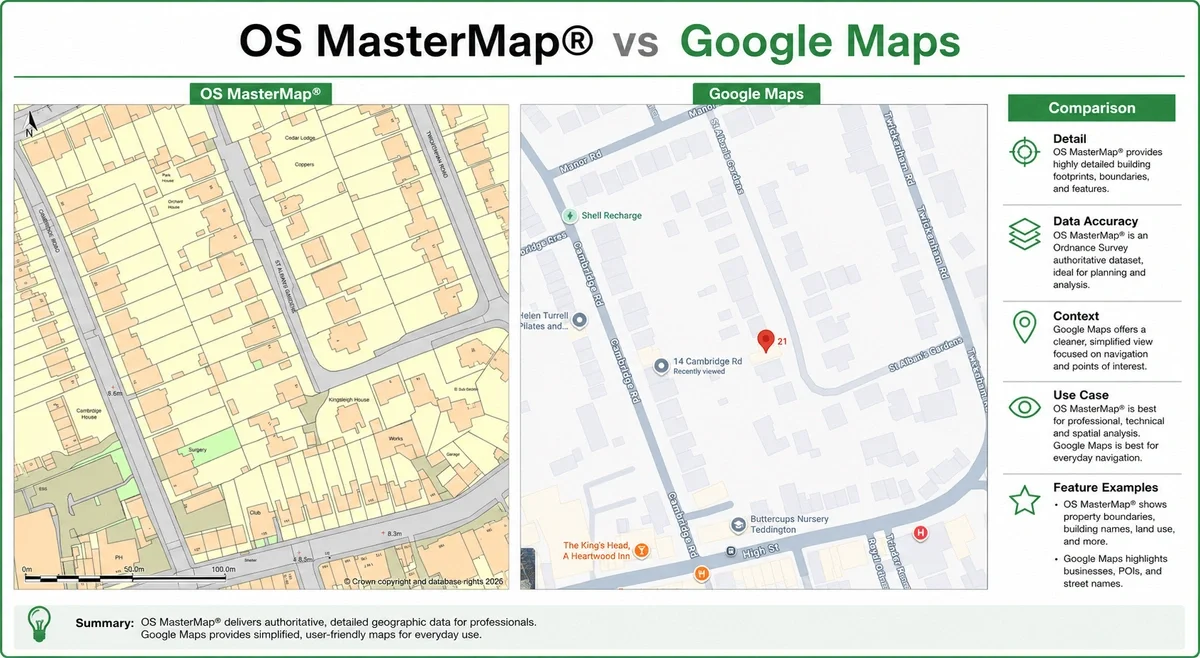
What Is OS MasterMap®?
OS MasterMap® is Ordnance Survey’s most detailed mapping product.
It forms part of Great Britain’s authoritative geospatial framework.
Unlike visual map platforms, OS MasterMap® stores geographic features as structured vector objects.
Each mapped feature contains attributes and geometry.
This includes:
- building footprints
- roads
- pathways
- water features
- land parcels
- site context
- infrastructure detail
Every object is digitally maintained and updated.
This allows professionals to integrate the data directly into:
- AutoCAD
- Revit
- GIS systems
- planning reports
- engineering workflows
- site analysis models
OS MasterMap® is commonly supplied in:
- DWG
- DXF
- GML
Professional users rely on it because it provides scalable, editable mapping suitable for real-world analysis.
What Is Google Maps Designed For?
Google Maps is designed primarily for:
- navigation
- route planning
- local search
- consumer location reference
Its interface prioritises:
- speed
- readability
- mobile usability
- visual simplicity
To achieve this, mapping geometry is often simplified.
The platform is optimised for user experience rather than engineering-grade positional analysis.
Google Maps performs exceptionally well for:
- finding businesses
- navigation
- estimating travel time
- visual orientation
However, it is not designed for:
- planning submissions
- legal interpretation
- CAD integration
- measured design work
- survey-grade analysis
Positional Accuracy: The Critical Difference
This is the most important distinction.
OS MasterMap® is built from professional survey methodologies including:
- ground survey measurements
- GNSS positioning
- aerial imagery
- LiDAR capture
- continuous spatial maintenance
According to Ordnance Survey documentation, OS MasterMap® Topography Layer positional accuracy depends on the original survey scale.
For urban mapping surveyed at 1:1250 scale, OS states:
- Absolute accuracy: typically around 0.9m at 99% confidence
- Relative accuracy: approximately ±1.1m over distances up to 60m
- RMSE accuracy: approximately 0.5m
At 95% confidence levels, absolute accuracy is stated at approximately 0.8m. (mapserve.co.uk)
This level of positional consistency is why OS MasterMap® is widely used for:
- planning applications
- CAD production
- engineering design
- utilities
- infrastructure projects
- site analysis
Google Maps does not publish survey-grade positional specifications for its base mapping in the same way Ordnance Survey does.
However, Google states that GPS-based positioning within Google Maps is typically accurate to around 20 metres under normal conditions. (support.google.com)
Independent studies assessing Google Earth and Google mapping imagery have reported varying positional accuracy results depending on:
- imagery source
- location
- urban density
- terrain
- satellite epoch
Published research has found:
- approximately 39.7m RMSE horizontal accuracy in one global study comparing Google Earth imagery against Landsat GeoCover control points (pmc.ncbi.nlm.nih.gov)
- approximately 1.8m horizontal accuracy in a localised Khartoum study using GPS control points (academia.edu)
- reported Google mapping accuracy ranges between 1.3m and 10.5m in recent comparative field testing (researchgate.net)
The key issue is consistency.
Google Maps is designed primarily for:
- navigation
- consumer orientation
- search usability
- route planning
OS MasterMap® is designed specifically for professional geospatial accuracy and structured mapping workflows.
That distinction matters significantly when producing scaled plans.
Even relatively small positional discrepancies can create:
- incorrect boundary assumptions
- offset CAD overlays
- inaccurate site layouts
- planning inconsistencies
Professionals therefore use OS-based mapping when positional reliability and repeatable geometry matter most.
Why Google Maps Often “Looks” More Detailed
This is one of the most misunderstood aspects of digital mapping.
Google Maps combines:
- labels
- points of interest
- satellite imagery
- road styling
- consumer overlays
This can make it appear more detailed.
But visual richness is not the same as structured mapping accuracy.
OS MasterMap® contains:
- vector geometry
- classified features
- scalable objects
- measurable spatial data
This makes it far more useful for:
- CAD
- planning
- engineering
- site analysis
Google Maps is visually informative.
OS MasterMap® is professionally usable.
Planning Applications: Why Google Maps Is Usually Rejected
Most UK planning authorities require plans derived from licensed Ordnance Survey mapping.
Google Maps screenshots are generally unsuitable because they:
- are not properly licensed for planning submission
- may lack required copyright statements
- are not intended for scaled drawing production
- do not provide reliable professional geometry
Common issues include:
- incorrect scale bars
- blurred print quality
- inaccurate tracing
- missing site detail
Professional planning plans are usually based on:
- OS MasterMap®
- licensed location plans
- licensed site plans
This is one reason planning consultants and architects avoid consumer map screenshots.
CAD Workflows: Raster vs Vector Mapping
Another major difference is data structure.
Google Maps is largely consumed as raster imagery.
Raster imagery:
- does not scale cleanly
- cannot snap accurately
- loses quality when enlarged
- creates tracing inefficiencies
OS MasterMap® is vector-based.
This allows:
- clean scaling
- editable geometry
- CAD layer control
- BIM integration
- accurate snapping
- structured workflows
For architects and surveyors, this dramatically reduces redraw time.
It also improves:
- design coordination
- modelling efficiency
- planning consistency
- drawing accuracy
Licensing Differences
Licensing is another major distinction.
OS MasterMap® is licensed professional mapping.
It is supplied under Ordnance Survey licensing terms.
Google Maps is licensed primarily for consumer viewing.
This creates important commercial limitations.
For example, screenshots copied into:
- reports
- CAD drawings
- planning applications
- commercial documentation
may not satisfy professional licensing requirements.
This is why architects, surveyors and planning consultants typically source mapping from licensed OS providers.
Why Professionals Use OS MasterMap®
Professionals choose OS MasterMap® because it supports:
Accurate site analysis
Reliable geometry improves early-stage feasibility work.
Planning compliance
Licensed mapping reduces validation risk.
CAD efficiency
Editable vector data accelerates production workflows.
Consistent scaling
Geometry remains usable across multiple drawing scales.
Better coordination
Structured mapping integrates into consultant workflows.
Reduced redraw costs
Teams spend less time rebuilding inaccurate base plans.
Common Mistakes When Using Google Maps Professionally
1. Tracing screenshots into CAD
This introduces scaling and alignment problems.
2. Assuming imagery defines boundaries
Google Maps does not establish legal boundaries.
3. Using screenshots in planning submissions
This can create validation issues.
4. Measuring from aerial imagery
Consumer imagery is not intended for precise measurement.
5. Treating visual detail as survey accuracy
A detailed-looking map is not necessarily spatially precise.
When Google Maps Is Appropriate
Google Maps remains extremely useful for:
- navigation
- local search
- travel planning
- informal location reference
- quick site orientation
It simply serves a different purpose.
For consumer mapping, it is excellent.
For professional spatial workflows, OS-based mapping is generally more appropriate.
When OS MasterMap® Is the Better Choice
OS MasterMap® is typically preferable when you need:
- planning application plans
- CAD-ready mapping
- vector data
- accurate site context
- structured geospatial data
- professional mapping compliance
- scalable design workflows
This is why it is widely used across:
- architecture
- planning
- surveying
- engineering
- infrastructure
- utilities
- development
How MapServe® Helps
MapServe® provides licensed access to OS MasterMap® and related professional mapping products.
Users can download mapping instantly in:
- DWG
- DXF
- GIS-ready formats
Additional professional layers include:
- 1m contours
- building heights
- freehold boundaries
- National Tree Map™
This allows consultants and design teams to begin projects with reliable base mapping from the outset.
FAQs
Is OS MasterMap® more accurate than Google Maps?
Yes. OS MasterMap® is designed for professional spatial accuracy and structured mapping workflows.
Can I use Google Maps for planning applications?
Generally no. Most planning submissions require licensed Ordnance Survey-based mapping.
Why do architects use OS MasterMap®?
Because it integrates cleanly into CAD and BIM workflows whilst providing accurate vector geometry.
Does Google Maps define legal boundaries?
No. Google Maps should not be treated as a legal boundary reference.
What format is OS MasterMap® supplied in?
Common formats include DWG, DXF, GML and PDF.
Conclusion
OS MasterMap® and Google Maps are built for fundamentally different purposes.
Google Maps excels at navigation and consumer location search.
OS MasterMap® provides structured, professionally usable geospatial data suitable for:
- planning
- CAD
- engineering
- surveying
- development workflows
For projects requiring accurate, scalable and professionally licensed mapping, OS MasterMap® is typically the more appropriate solution.