
MasterMap® and Google Maps serve very different purposes.
While both display geographic information, their accuracy, structure and intended use are fundamentally different.
Understanding these differences is critical for planning and professional applications.
Quick Comparison
| Feature | MasterMap® | Google Maps |
|---|---|---|
| Data Type | Structured vector dataset | Visual consumer map |
| Accuracy | Survey-grade | Generalised |
| Licensing | Professional licence | Consumer use |
| Planning Use | Accepted by councils | Not accepted |
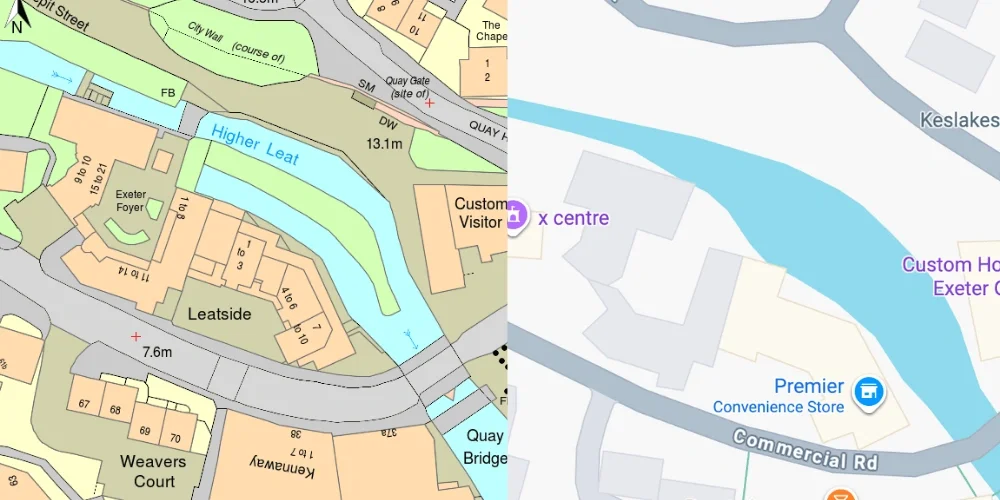
OS MasterMap® Google Maps
Positional Accuracy
MasterMap® is created using:
-
Ground surveying
-
GNSS measurements
-
Aerial photography
-
LiDAR
It provides survey-level accuracy suitable for planning and engineering.
Google Maps is designed primarily for navigation and general location reference, not legal or professional measurement.
Data Structure
MasterMap® contains:
-
Object-level vector data
-
Unique TOIDs
-
Defined land parcel boundaries
-
Detailed building footprints
Google Maps displays visual map tiles and simplified geographic representation.
It is not a downloadable professional dataset.
Use in Planning Applications
Local authorities require mapping derived from licensed Ordnance Survey datasets.
Google Maps screenshots:
-
Do not include required copyright notices
-
May lack precise boundary data
-
Are not licensed for planning submission
Professional planning maps must originate from authoritative datasets.
Legal and Licensing Differences
MasterMap® is protected by Crown copyright and supplied under licence.
Google Maps is licensed for consumer viewing, not for professional planning submissions.
For a full explanation of licensing, see our guide to OS licensing.
When Google Maps Is Appropriate
Google Maps is suitable for:
-
General location reference
-
Navigation
-
Informal context
It is not suitable for:
-
Planning applications
-
Legal boundary definition
-
Engineering design
How Professionals Access Accurate Mapping
Professionals obtain MasterMap® data through licensed suppliers.
You can download licensed MasterMap® extracts directly from MapServe® in DWG, DXF or PDF format.
Frequently Asked Questions
Is MasterMap® more accurate than Google Maps?
Yes. MasterMap® is survey-grade and continuously maintained.
Can I submit Google Maps with a planning application?
No. Planning authorities require licensed Ordnance Survey-based mapping.
Where can I access MasterMap®?
You can download licensed MasterMap® data from MapServe®.
Conclusion
MasterMap® provides survey-grade, structured geospatial data suitable for planning, engineering and legal applications, while Google Maps is a consumer navigation platform not intended for professional submission.
For accurate, compliant mapping, download MasterMap® directly from MapServe®.